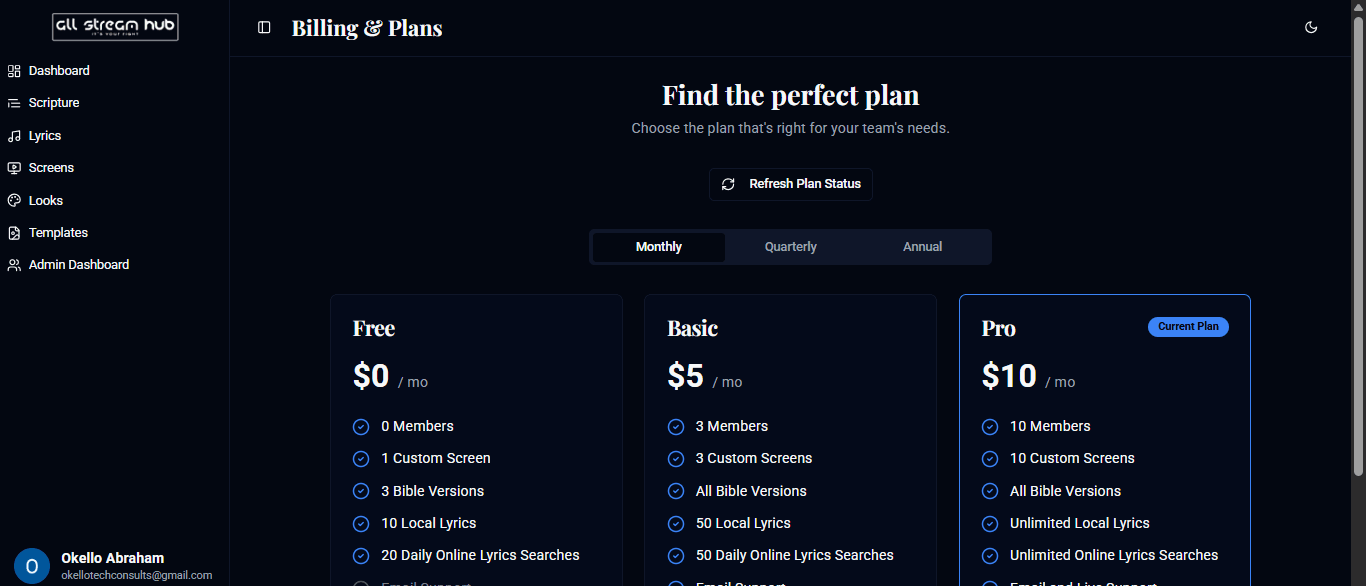
Compare tiers and see exactly what your current plan includes.
Steps
1Open Billing & Plans from your team menu.
2Switch between Monthly, Quarterly, and Annual pricing.
3Compare tiers — Free, Basic, and Pro — by members, custom screens, Bible versions, and lyrics storage included.
4Your active plan is marked Current Plan, with an option to upgrade when you're ready.
Screenshots
The Billing & Plans comparison table
Transcript
The Billing and Plans page lays out exactly what each tier includes, side by side — team members, custom screens, Bible versions, and lyrics storage — with Monthly, Quarterly, and Annual pricing to compare. Your current plan is clearly marked, so you always know where you stand, and upgrading is available right from this page whenever your team outgrows its tier.
Ready to Go Live?
Add professional scripture, lyrics, and lower-thirds to your livestream with AllStreamHub — free to start.