

Add Lyrics, Scripture and Lower Thirds to Your Livestream — It's Easy
The fastest way to get professional, relevant graphics on screen. Design once, go live in seconds, and let AI find the verse while you preach.
No credit card required. Free plan, forever.
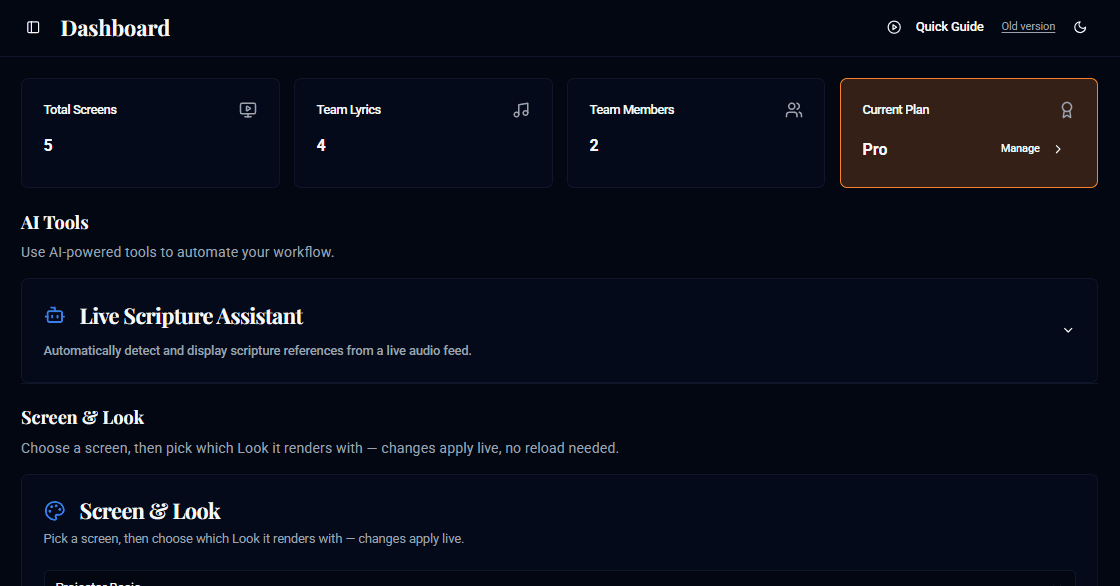
Powerful Features, Simple Controls
Everything you need to create professional-looking live streams without the headache.
Real-Time Dashboard
Control all your content from a central dashboard. Send scriptures, lyrics, and lower-third text updates to your screens instantly.
Powerful Screen Designer
A fully-featured, drag-and-drop editor to build your screen layouts. Customize fonts, colors, backgrounds, animations, and dimensions.
Professional Templates
Get started quickly with a variety of pre-built templates for scriptures, lyrics, and lower-thirds.
Full Scripture Navigator
Every major Bible version, instantly searchable, with browsing history so you never lose your place mid-service.
Lyrics Library
A huge built-in song library plus your own personal library — search once, display in seconds.
Mobile & Team Control
Run the whole show from your phone, and invite team members so anyone can operate a screen from anywhere.
Never Lose Your Place — AI Finds the Verse While You Preach
AllStreamHub listens to the live transcript of your sermon and automatically recognizes scripture references — even informal ones like "the story of the prodigal son" — and gets them ready to display. Your screen operator never has to scramble to keep up.
"...turn with me to the story of the prodigal son..."
Go Live in 3 Easy Steps
Design Your Screen
Use the powerful Screen Designer to create a custom layout with text, images, and dynamic elements like timers.
Copy the Link
Every screen you create has a unique URL. Simply copy this link to your clipboard.
Go Live
Paste the link as a 'Browser Source' in your streaming software (like OBS) to see your overlay live.
Runs the Layout You Already Know
One dashboard, four looks. Switch to a control layout that already feels like home — every one of them drives the exact same screens and broadcasts.
Onyx
Dark, cinematic, slide-grid
Familiar if you've used a dark, cinematic slide-grid presenter — a wrapped grid of slide thumbnails you click straight to live.
Slate
Light, Office-familiar, Preview→Live
Familiar if you've used a light, Office-styled service planner — a Preview pane you check before it goes to a separate Live pane.
Aurora
Bright, card-based, collaborative
Familiar if you've used a bright, cloud-collaborative planner — a card list of service content with your teammates' presence shown live.
Forge
Classic desktop, docked panels
Familiar if you've used a classic docked-panel desktop presenter — menus, toolbars and a keyboard-first slide controller.
Choose Your Plan
Start for free and scale up as your needs grow.
Free
$0 / mo
For small teams and personal projects.
- 1 Custom Screen
- Default Looks Only
- 3 Bible Versions
- 10 Local Lyrics
- 20 Daily Online Lyrics Searches
- Email Support
Basic
$5 / mo
For growing teams that need more room.
- 3 Members
- 3 Custom Screens
- 3 Custom Looks
- All Bible Versions
- 50 Local Lyrics
- Email Support
Pro
$10 / mo
For churches running multiple screens live.
- 10 Members
- 10 Custom Screens
- Unlimited Looks + Shared Library
- All Bible Versions
- Unlimited Local Lyrics
- Email and Live Support
Frequently Asked Questions
What is AllStreamHub?
AllStreamHub is browser-based software for adding scripture, song lyrics, and lower-third graphics to a church livestream or in-room screen. You design a screen once, add its link to OBS, vMix, or any streaming app as a browser source, and control what appears from a real-time dashboard on any computer, tablet, or phone.
How do I get my overlay into my livestream?
Every screen you design gets its own unique URL. Paste that URL as a 'Browser Source' in OBS, vMix, or any other streaming software, and your overlay appears live — no plugins or downloads required.
Do I need to install any software?
No. AllStreamHub runs entirely in your browser and works from your phone, tablet, or computer. Your streaming software just needs to be able to load a web page as a source, which OBS and vMix both support out of the box.
How does the AI scripture detection work?
The AllStreamHub Live Scripture Assistant listens to the sermon through your browser’s speech recognition and recognizes scripture references as they are spoken — exact ones like "Romans 8:28" and informal ones like "the story of the prodigal son" — then gets the passage ready to display. It needs a browser with speech recognition support, such as Google Chrome.
How to auto-detect scripture while you preach →Can multiple people on my team control the screens?
Yes. Basic and Pro plans let you invite team members, so someone can run the scripture screen while someone else runs lyrics or lower-thirds — all from their own devices.
How much does AllStreamHub cost?
AllStreamHub has a Free plan at $0, a Basic plan at $5 per month, and a Pro plan at $10 per month. Paying quarterly or annually costs less: Basic is $14 per quarter or $50 per year, and Pro is $28 per quarter or $100 per year. Pro is also available as Pro Lifetime for a one-time payment of $99, with no recurring fees.
Can I try it before I pay?
Yes — the Free plan is free forever, no credit card required. You can create a screen and go live today.
More questions? Read the full AllStreamHub FAQ
Ready to Go Live?
Join teams already running professional livestream graphics with AllStreamHub.
Start for Free